How Many Cold Emails Per Day? Per-Inbox and Per-Domain Limits (2026)

Founder and CEO of Ozigi. Writes about go-to-market, content strategy, and the tooling small teams rely on.
TL;DR: Send 20 to 50 cold emails per inbox per day, and roughly 100 to 250 per domain, assuming 3 to 5 warmed inboxes on that domain. New domains start much lower: 10 to 20 per inbox and under 60 total. The cap includes warmup sends. To send more, add inboxes and domains rather than pushing one harder. Keep spam complaints under 0.1% and bounces under about 2%, because Google now rejects mail that crosses its thresholds. The 5,000-a-day bulk sender rule applies to consumer inboxes, but its authentication requirements apply to everyone.
People ask this question in two units, per inbox and per domain, and most guides answer only one, then act like the other doesn't exist. Both numbers are real, they're just different ceilings on the same machine. Here are both, plus the provider rules that now decide whether your mail arrives at all.
How Many Cold Emails Can You Safely Send Per Inbox?
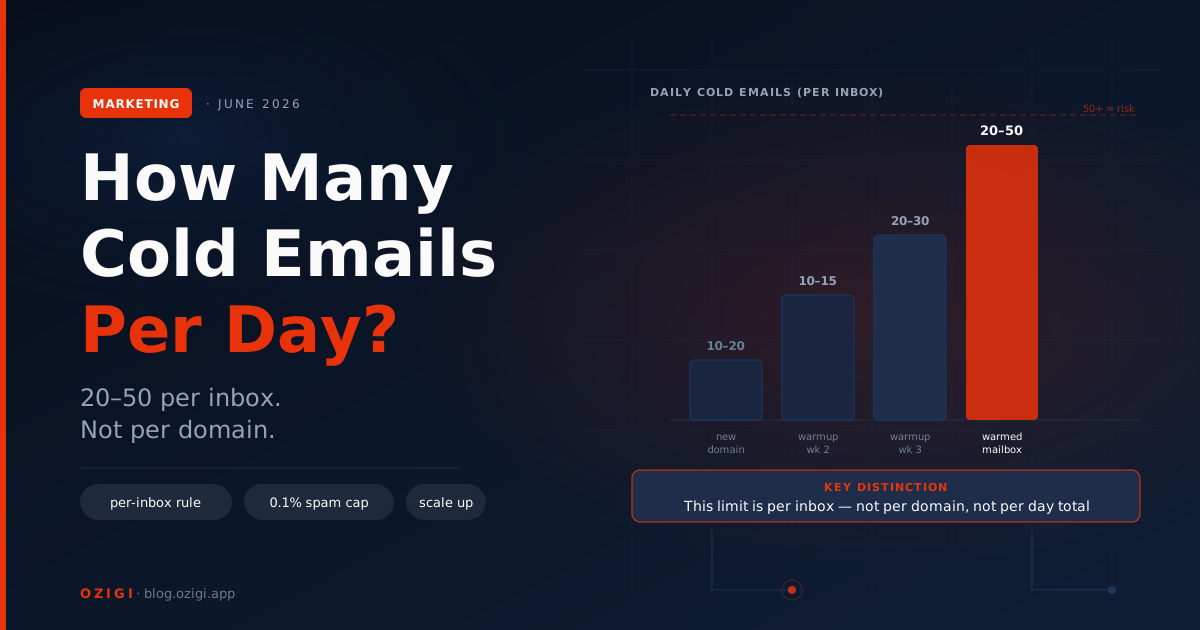
The safe range is 20 to 50 cold emails per inbox per day for a warmed mailbox, and 10 to 20 for a new one. Push a single inbox past that and spam filters notice fast, even with everything else set up correctly.
Three things move the number: domain age, warmup stage, and list quality. A domain you registered last week has no reputation and should send little. A domain with two years of clean sending history can run higher. And no volume is safe if your list is full of invalid addresses, because bounces wreck your reputation faster than volume does.
One detail most guides bury: the cap includes warmup emails. If a warmup tool is sending 25 messages a day from that inbox to build reputation, you have roughly 25 cold slots left, not 50. Count both against the same ceiling.
How Many Cold Emails Per Day Per Domain?
A warmed domain with 3 to 5 inboxes safely carries about 100 to 250 cold emails per day. That's the per-inbox ceiling multiplied out, and it's the number that actually matters when you're planning outreach volume, because you scale by adding domains, not by pushing inboxes harder.
The working math per domain:
| Domain state | Inboxes | Per-inbox cap | Domain total per day |
|---|---|---|---|
| New (under 4 weeks) | 1 to 2 | 10 to 20 | 20 to 40 |
| Warming (weeks 4 to 8) | 2 to 3 | 20 to 30 | 40 to 90 |
| Established, clean history | 3 to 5 | 40 to 50 | 120 to 250 |
Two caveats keep this honest. First, providers judge reputation at both levels: the individual sending address and the domain behind it. Five inboxes each behaving well on one domain reinforce each other. One inbox spiking complaints drags down all five. Second, don't run cold outreach from your main brand domain at all. Register separate sending domains, so a deliverability problem on outreach never touches the domain your product, docs, and transactional email live on.
So when someone says "the limit is 200 a day," they usually mean a fully built domain: 4 to 5 inboxes, each warmed, each under 50. It's not a setting. It's infrastructure.
What Are the Official Provider Limits, and Why Don't They Matter?
Google Workspace allows up to 2,000 sends a day and free Gmail allows 500, but those are technical caps, not safe cold email volumes. They exist so the servers don't fall over, not as a promise that 2,000 cold emails will land anywhere but spam.
Treat the two numbers as different questions. The provider limit answers "when will Gmail return an error?" The deliverability limit, 20 to 50 per inbox, answers "when will filters start eating my mail?" The second one always arrives first. A sender who pushes 500 cold emails from one Workspace inbox will be inside the technical limit and inside the spam folder by the end of the week.
Why Is the Ceiling Measured Per Inbox and Not Per Campaign?
Because inbox providers judge reputation at the level of the sending address and its domain, not your campaign. Each mailbox earns its own trust, so each mailbox carries its own ceiling.
This changes how you scale. You do not send more by cranking one inbox to its limit. You add inboxes, each warmed separately, spread across a few domains. The rough math:
| Daily cold volume | Inboxes needed (at ~40/inbox) | Domains (at 3 to 5 inboxes each) |
|---|---|---|
| 40 | 1 | 1 |
| 200 | 5 | 1 to 2 |
| 500 | 12 to 13 | 3 to 4 |
| 1,000 | 25 to 34 | 5 to 10 |
The pattern is plain: real volume comes from infrastructure, not from one overloaded mailbox. A solo founder rarely needs this. A team scaling outbound should plan inboxes and domains the way they would plan servers.
What Is the 5,000-Email Bulk Sender Rule, and Does It Apply to Cold Email?
The 5,000-email rule is the threshold Gmail and Yahoo use to classify a domain as a bulk sender, triggering stricter requirements. It applies to anyone sending 5,000 or more messages a day to consumer Gmail or Yahoo addresses, and once a domain crosses it, the classification is permanent.
In practice, cold email should stay well under 5,000 per domain anyway, so the threshold rarely bites a sane cold campaign directly. But two parts of the rule apply to every sender regardless of volume: you must authenticate with SPF, DKIM, and DMARC, and you must keep your spam rate low. Gmail and Yahoo have required this of bulk senders since early 2024, along with one-click unsubscribe, per Google's sender guidelines. Microsoft added similar rules for Outlook and Hotmail in May 2025.
So the bulk rule is less a volume cap for cold email and more a reminder: authenticate everything, keep complaints near zero, and make unsubscribing easy.
What Spam and Bounce Rates Will Get You Flagged?
Keep your spam complaint rate under 0.1% and your bounce rate under roughly 2%. Google treats 0.1% as the working ceiling for healthy senders and 0.3% as the hard line where enforcement begins.
The numbers are unforgiving at low volume. If you send 1,000 emails and three people mark you as spam, you have hit 0.3%. That's why list quality matters more than raw volume: a clean, verified list keeps both bounces and complaints down, while a dirty list spikes both at once.
Enforcement also got stricter recently. Google moved from temporary delays to permanent rejections for non-compliant mail starting in November 2025, so the cost of crossing a threshold is no longer a slap on the wrist. Watch your numbers in a postmaster tool, and pull back the moment bounces or complaints climb.
How Do You Scale Cold Email Volume Safely?
You scale by adding authenticated inboxes across multiple domains, warming each one, and rotating sends across them. Volume is an infrastructure problem, not a per-email setting you turn up.
A safe scaling setup looks like this: register a few sending domains separate from your main brand domain, set up SPF, DKIM, and DMARC on each, create 3 to 5 mailboxes per domain, and warm them on a staggered schedule so they do not all come online at once. Then distribute your daily sends across the pool, keeping each inbox under its ceiling and each domain under roughly 250. Getting each domain ready is its own process, covered in the companion guide on how to warm up a sending domain in 2026.
How Should a Small Team Think About Outbound Volume?
A small team should send fewer, better-targeted emails to verified addresses rather than chasing volume. The teams winning at cold email in 2026 are not the ones sending the most. They are the ones whose lists are clean and whose messages earn replies.
This connects back to targeting. A tight ideal customer profile and real personalization mean you need far less volume to book the same meetings, because your reply rate is higher and your complaint rate is lower. Volume without targeting just burns domains faster. If your replies have dried up despite reasonable volume, the diagnosis order is covered in why am I getting no replies to my cold emails.
In the Ozigi GTM engine, each campaign runs under daily send limits by design, so the sequence paces itself rather than blasting a list and tripping a filter. The point is the same as everything above: steady and targeted beats fast and broad.
Frequently Asked Questions
How many cold emails can I send per day? Send 20 to 50 per inbox per day for a warmed mailbox, and 10 to 20 for a new one. The limit is per inbox, and it includes any warmup emails running on that inbox. New domains and unverified lists lower the safe number; clean lists and established domains raise it.
How many cold emails per day per domain? Roughly 100 to 250 for an established domain running 3 to 5 warmed inboxes at 20 to 50 sends each. A new domain should stay under 40 total until warmup completes. To go past 250 a day, add domains rather than adding more inboxes to one.
How many inboxes per domain for cold email? Three to five. Fewer wastes the domain; more concentrates risk, because one bad inbox drags down the reputation of every other inbox on that domain. Teams that need serious volume run several domains at 3 to 5 inboxes each.
Does the 5,000-emails-per-day rule apply to cold email? The 5,000-a-day threshold classifies a domain as a bulk sender to consumer Gmail and Yahoo inboxes, which a sane cold campaign stays under. But its core requirements, SPF, DKIM, and DMARC authentication plus low spam rates, apply to every sender regardless of volume.
What spam complaint rate is safe for cold email? Keep it under 0.1%. Google treats 0.1% as the working ceiling and 0.3% as the hard line where enforcement begins. At low volume the margin is thin: 3 complaints on 1,000 emails already hits 0.3%. Clean, verified lists are the main way to keep complaints near zero.
What bounce rate is too high for cold email? Aim to keep bounces under about 2%. A spike above 3% can damage your sender reputation and set a domain back by weeks. High bounce rates almost always come from unverified or stale lists, so verify every address before it enters a sequence.
How do I send thousands of cold emails a day safely? Use infrastructure, not brute force. At roughly 250 safe sends per domain, 1,000 a day means 4 to 5 fully built domains: 3 to 5 authenticated inboxes each, warmed on a staggered schedule, with verified lists feeding them. Keep each inbox under 40 to 50 sends a day.
Ozigi paces every campaign under safe daily send limits and writes outreach that earns replies instead of complaints. Source, score, and send from one place, free to start. Try the free cold email generator — no signup required.
About the author
Founder and CEO of Ozigi. Writes about go-to-market, content strategy, and the tooling small teams rely on.